Silos
Menu

Product

Product overviewThe panelNeeds youAgentsTasksAutomationsSilosEnginesOpen source

Solutions

Solutions overviewCoding agentsA small businessSupportFinance

Resources

Compared with terminal tabs

Company

About

Docs

All the docsInstall

Product › The panel

See what you already run, before you change anything.

The panel is Silos with you at the keyboard: every Claude Code and OpenCode conversation on your machine in one place, the accounts they run on, what each one loads and what it all costs. For anyone who has more than one session open today.

One list for every conversation, in a console or a chat

Conversations are listed under their agent in the sidebar, across projects. One you started by hand in a terminal shows up too, and Silos only reads it.

Open any conversation as the Real console, the engine's own terminal in a tmux session that outlives the browser, or as Chat. A started conversation can switch between the two and keep its whole history.
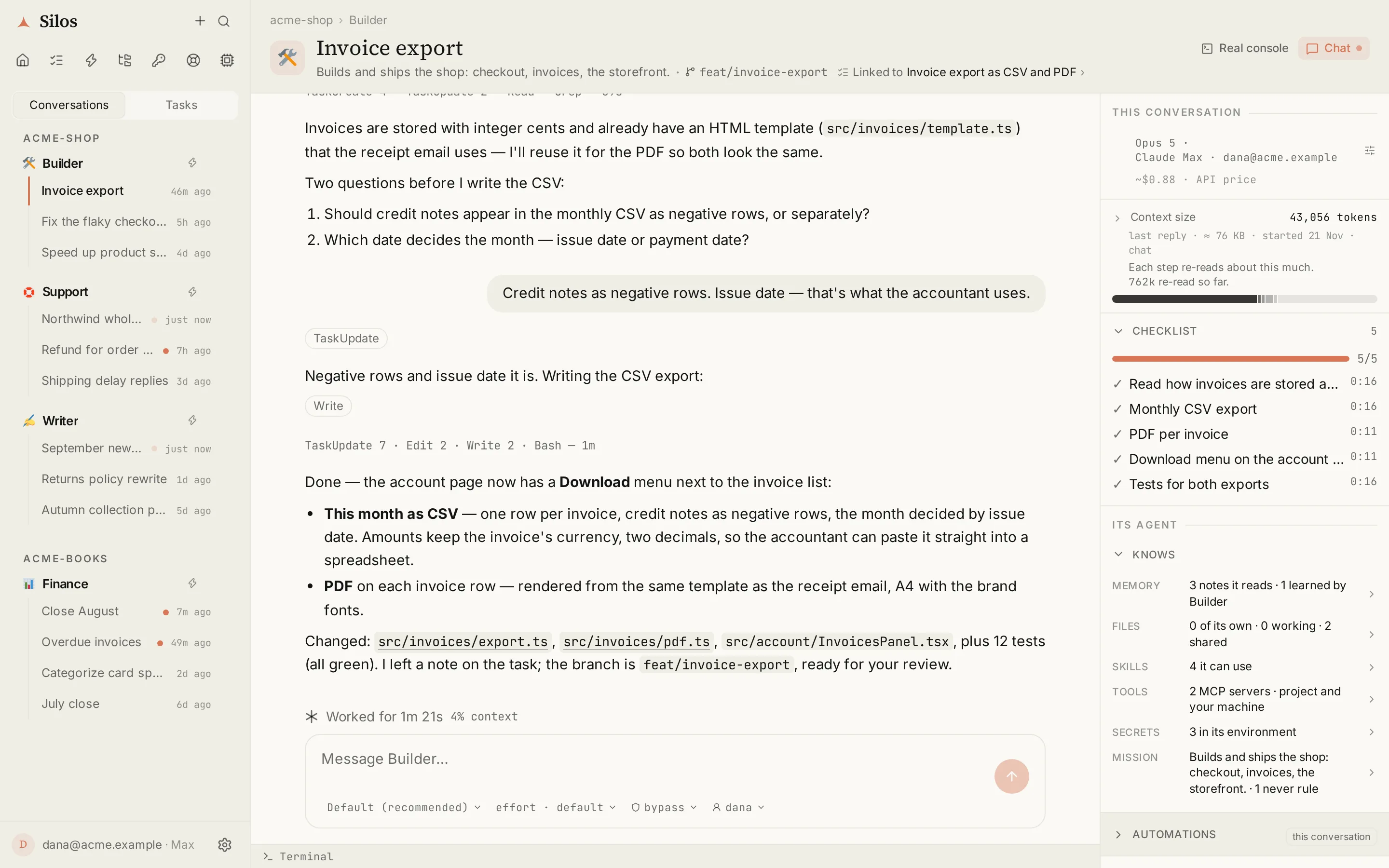
A conversation with an agent: the transcript, and a column with the model and account it runs on, its context size, its checklist and what the agent knows.
A conversation and its context column: account, model, checklist, what the agent knows. Demo data.

Know the limit before you hit it

Keep several Claude accounts on one machine and pick one per conversation in «Run on». Bars under the runs-on line show each window's percent used and its reset time, and turn amber when the account warns.

The Usage page splits what the fleet spent by agent, task, automation, conversation and account. A turn on a plan shows tokens and "on plan"; a turn on a key shows dollars at list price.

  • Claude · this machinein use

    5-hour window62%

    Weekly window34%

  • Claude · teamready

    5-hour window8%

    Weekly window51%

Two accounts, each with its usage windows.

What each session loads, with switches that are real

Everything an agent loads has one owner: you, the project, the agent or the conversation. The agent's Memory, Files, Skills and Tools tabs show it grouped that way, and At start says how many tokens a new conversation begins with, measured from real first replies.

Turning a skill, MCP server or plugin off is per folder and uses the engine's own switch. Each switch says whom it reaches, such as "every agent here — Builder · Support".

~19,000 tokens

what a new conversation starts with, measured

  • The agentmission, its memory
  • The projectCLAUDE.md, notes, skills
  • Silosits briefing
  • Youyour machine's instructions
  • The enginesystem prompt, tools
What a session loads, split by owner.

The panel compared with terminal tabs

Terminal tabsSilos
Finding a sessionScroll tabs or historyOne sidebar, by agent
The terminal itselfThe CLI, unmodifiedThe same CLI, in the browser
Usage windowsRun /usage per accountBars beside each conversation
What a session loadedRead the files yourselfSplit by owner, with token counts
One quick sessionFine as it isAlso fine; it shows up here too

Questions

Does Silos change my sessions?

No. Sessions Silos did not create are read and never modified. Deleting one moves its transcript to ~/.silos/trash/, which empties itself after 30 days.

Do I need tmux?

It is recommended. Each real console is a tmux session. Without tmux, conversations open as chat, with a strip that says why.

Can it turn off a server configured in my ~/.claude.json?

No. Silos reads that file and never writes it, so those rows show their state without a switch. Switches exist only where Claude Code itself offers one in the project folder.

Are the token counts estimates?

No. Tokens come from the transcripts, and At start is the median first reply of recent conversations. On OpenCode, whose records carry no token counts, Usage says "not measured on OpenCode" instead of guessing.

Does it work for a session that is already running?

Yes, it shows up and Silos follows its transcript. A skill or server you switch off affects new sessions only; a console already running keeps what it loaded.

See what you already run

Install Silos and every conversation on this machine shows up in one list, with its account and what it loaded.