Silos
Menu

Product

Product overviewThe panelNeeds youAgentsTasksAutomationsSilosEnginesOpen source

Solutions

Solutions overviewCoding agentsA small businessSupportFinance

Resources

Compared with terminal tabs

Company

About

Docs

All the docsInstall

Solutions › Coding agents

Know which session needs you without checking ten terminals.

Silos lists every Claude Code and OpenCode conversation on your machine, opens each one as the real console or a chat, and shows beside it the account it runs on, its usage windows and what it loaded.

Every session, in the console you already know

The sidebar lists conversations across all your projects, under their agent, including those you started by hand. A session in a worktree carries a «worktree» mark, and the conversation's header shows its git branch.

The Real console is the unmodified claude in a tmux session, shown in your browser. It outlives the browser and a restart of Silos, and each tab gets its own tmux client at its own size, so the same console opens on your phone through your tunnel. Chat is the other mode, and a started conversation switches between them with its whole history.

Real consoleChat
> export this month's invoices as CSV

● Read  src/invoices/template.ts
● Write src/invoices/export.ts
● Bash  npm test -- invoices
  12 passed

Done. One row per invoice, credit notes as
negative rows. Branch feat/invoice-export.

The unmodified CLI, in your browser.
The real terminal, with the switch to chat beside it.

See the limit before a turn stops on it

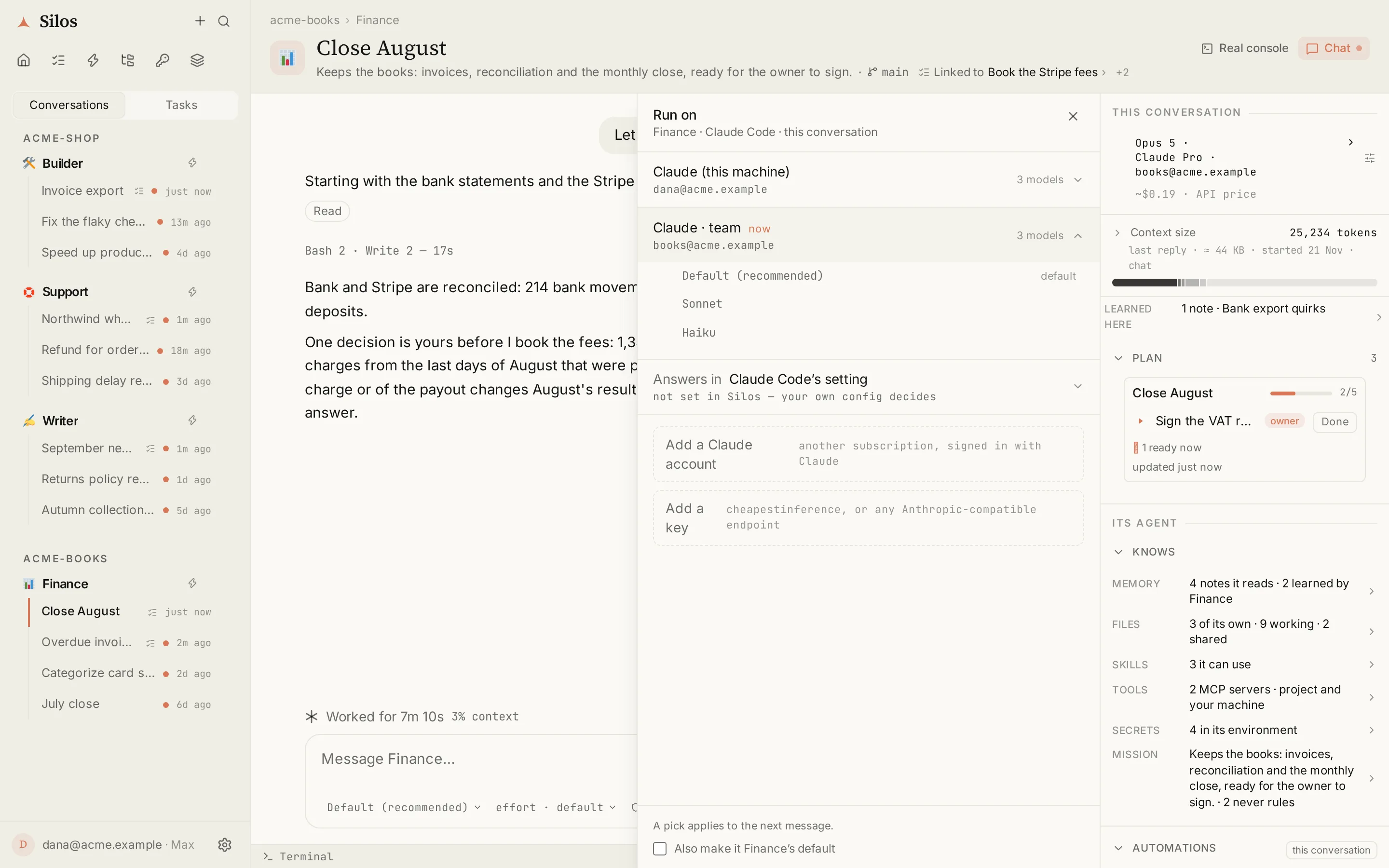
Connect more Claude accounts in Settings › Providers, each with Claude's own sign-in, and pick one per conversation in «Run on». Bars under the runs-on line show each 5-hour and weekly window, and turn amber when the account warns.

A Fallback chain sends the next turn to a key provider when the primary hits its usage limit, until the window resets. The Usage page splits what was spent by agent, task, conversation and account.

The Run on panel of one conversation: two Claude accounts, the one in use marked, and the models each offers.
The Run on panel with two Claude accounts. Demo data.

Hand off a task and see what came back

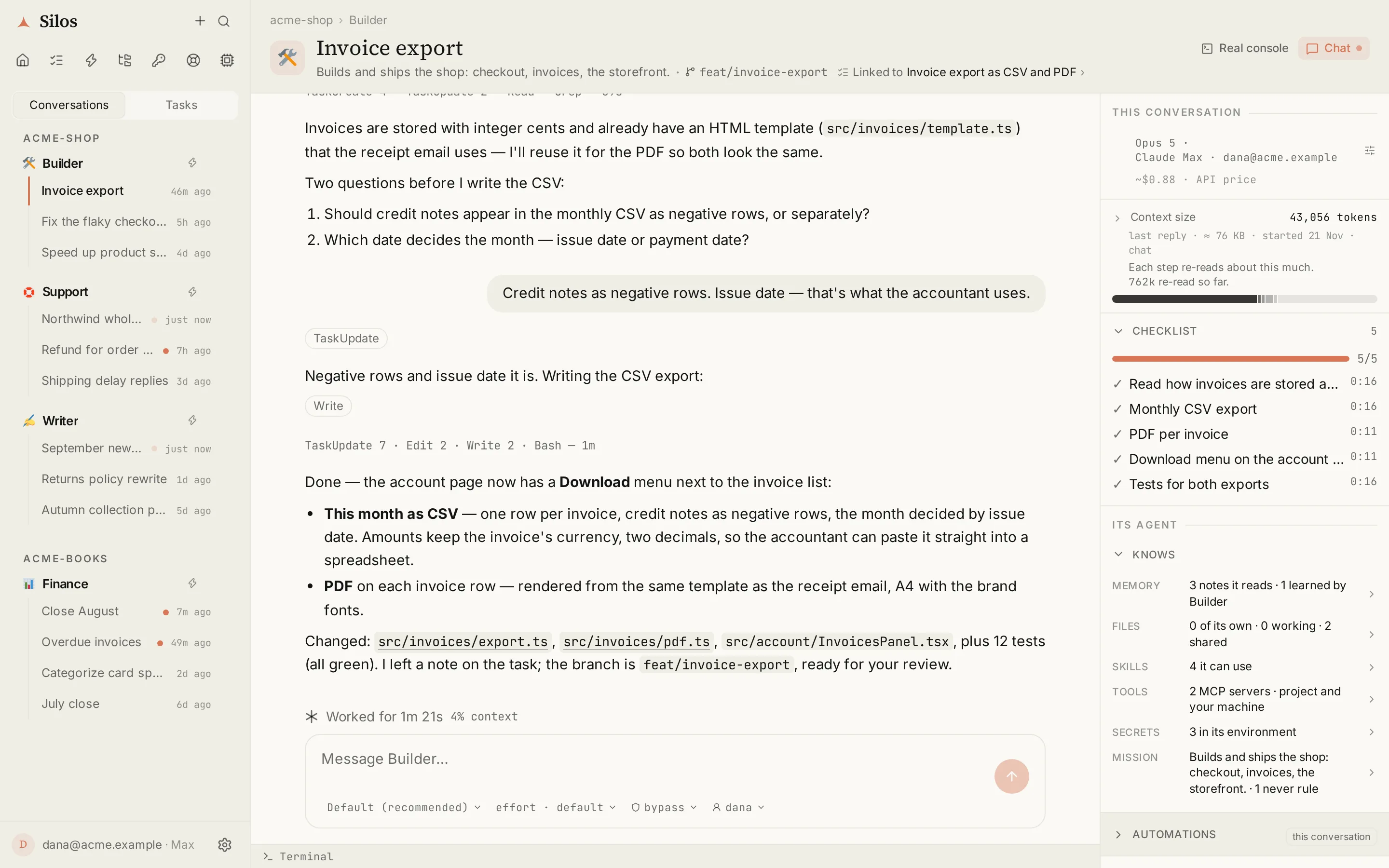
Give a task to an agent in a sentence. Its page lists the conversations that worked it, its notes, and «Builder is on it · <tool> · <n>s ago» while it runs.

Beside each conversation, the context column shows «Started with», the tokens of its first reply split by owner, then its Checklist, its Subagents and their transcripts, the Files it wrote or read, and the pull requests it linked. The «Check the work when a conversation ends» template has a second agent read the result and report only what is wrong.

A conversation with an agent: the transcript, and a column with the model and account it runs on, its context size, its checklist and what the agent knows.
A conversation and its context column. Demo data.

Silos compared with terminal tabs

Terminal tabsSilos
The CLIThe real oneThe same one, unmodified
Finding a sessionScroll through tabsOne sidebar, every project
Which one needs youLook at each tab«Waiting for you» and Needs you
Usage windowsRun /usage per accountBars beside each conversation
From the phoneSSH and tmux attachA browser tab, through your tunnel
One quick sessionFine as it isAlso fine, and it shows up here

Questions

Does Silos wrap or patch Claude Code?

No. It runs the claude on your PATH and reaches it only through documented flags, settings files, hooks, CLAUDE.md and skills. What it adds to a launch, such as the agent's mission and its territory, is listed on the agent's page under At start.

Will my existing sessions show up?

Yes. Sessions Silos did not create are read and never modified. Deleting one moves its transcript to ~/.silos/trash/, which empties itself after 30 days.

Can I review a diff in Silos?

No. The column lists the files a conversation touched, each one opening in a viewer, plus its branch, worktree and the pull requests it linked. Reading the diff stays in git and your own tools.

Is running several Claude accounts on one machine fine?

Silos keeps each extra account as its own Claude Code config folder, signed in with Claude's own login, and never handles the credentials. Settings › Providers reminds you that a Claude subscription is for your own use, and that work for someone else's business should run on an API key.

What do I lose on OpenCode?

Some things are read from records only Claude Code writes, so on OpenCode they are absent: no «Started with», no «% context», no plan-mode proposal. Usage says «not measured on OpenCode» rather than guessing.

Open every session from one place

Install Silos on the machine where your agents work, and every conversation shows up in one list with its account, its limits and what it loaded.