Silos
Menu

Product

Product overviewThe panelNeeds youAgentsTasksAutomationsSilosEnginesOpen source

Solutions

Solutions overviewCoding agentsA small businessSupportFinance

Resources

Compared with terminal tabs

Company

About

Docs

All the docsInstall

Solutions › A small business

Your agents keep the work moving, and you answer only what is yours.

Each agent holds one job: the books, the support inbox, the shop's code, the newsletter. Silos brings you the decisions that are yours, on your computer or your phone, and a digest once a day.

Each agent has one job and stays inside it

An agent is a name, a mission in your words and a folder: Finance keeps the books, Support answers the mailbox, Builder works on the shop's code, Writer drafts the newsletter. Lines that start with «Never:», such as «Never: pay a supplier.», say what it must always ask you about first.

Every new agent is born with its territory on: «Finance keeps out of your keys, your settings and other agents' desks.» Credentials go into the Vault and reach only the agents you name.
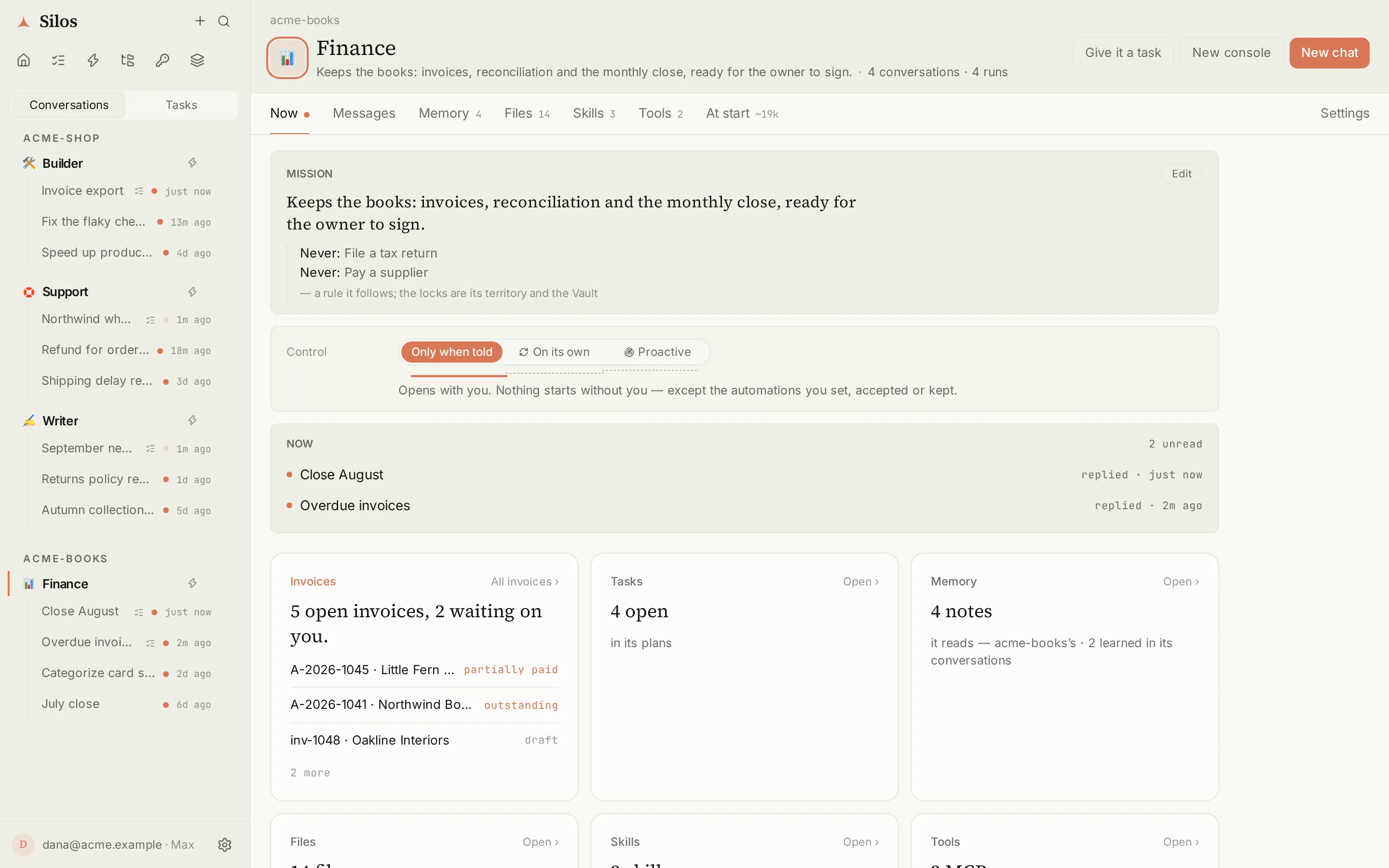
An agent's page: its mission, two things it must never do, its control setting and its open conversations.
An agent's page: its mission, two Never lines and its control. Demo data.

One inbox for what only you can decide

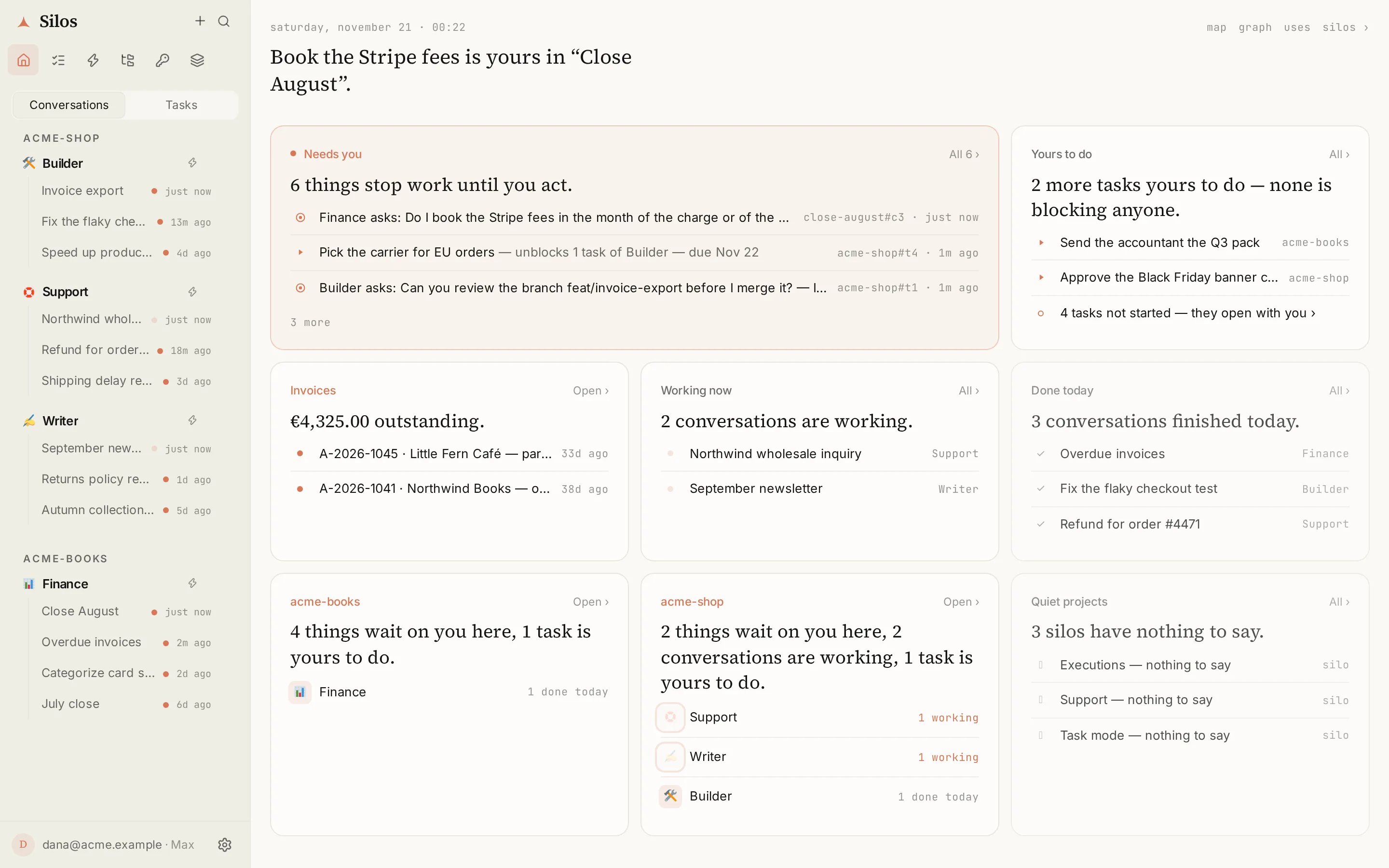
Needs you holds what blocks on you, and only that: a question from an agent, a run waiting for your OK, a proposal, a failed run, an agent that reached its daily limit. When it is empty it says «Nothing needs you.»

When an agent's question is a choice, each option is a button. One tap adds your answer to the task as a note, clears the wait, and the agent carries on. Your own tasks sit beside it in Yours to do.

Needs you

Finance asks: do I book the Stripe fees in the month of the charge or of the payout?

An agent's question with two answers you can tap.

Check in from your phone, or once a day

Silos installs as an app on a phone, through a tunnel to the machine it runs on. Push notifications ring when something new needs you, and say only how many things and what kind, never a name or what a row says.

Once a day, at 08:00 unless you choose another hour, the digest says what waits, what happened and what is coming. It is made of counts and real rows, with no agent and no tokens spent.

Silos' home screen: agents and conversations on the left, a sentence on top, then Needs you, Yours to do, Working now, Done today and a tile per project.
Home: the pulse, Needs you and Yours to do. Demo data.

Silos compared with separate chats and a to-do list

Chats and a to-do listSilos
Getting startedOpen a chat, nothing to installA technical person installs it once
ContextPasted again each timeMission and folder notes load at every start
What needs youOpen each chat to find outNeeds you, answered in one tap
Work while you are awayWaits for youAgents set On its own start what you gave them
SpendSeen on the billA daily max and a spend cap per agent
CredentialsPasted into the chatIn the Vault, scoped per agent

Questions

Do I need to be technical?

To use it, no: every screen says what will happen before you press. To install it, yes, once: Node.js, Claude Code, a command in a terminal, and a tunnel if you want it on your phone. Ask someone technical to do that part.

Can an agent pay, send or file something on its own?

A «Never:» line is a rule the agent follows, not a lock. The real limits are what it can reach: its territory, and the credentials you give it. A credential signed by Silos never enters the agent's process, but whatever that key allows at the service, a signed call can do.

What does it cost to run?

Silos is open source. The agents run on your Claude subscription or an API key. Each agent has a daily max of starts and a daily spend cap, and Usage shows what each agent spent.

What happens when the subscription hits its limit?

A chat turn says when Silos will resume it, or continues on a fallback key if you set one. An account whose limit stopped automations gets one Needs you row, naming the window and when it resets.

Can my team use it too?

Silos has one owner. You can name a teammate as the owner of a task and see what waits on them, but they get no door of their own: you relay.

Give each agent its job

Name an agent, write its mission in a sentence or two, and let Needs you bring back only what is yours.